Identity & intent
Custom title or evolving brief, project, provider, first prompt, and latest prompt. See what started the conversation and where it has moved.
LOCAL COMMAND CENTER FOR AI CODING
A local command center for parallel AI coding work. Find sessions across projects and CLIs, see what needs your attention, follow the branches of a discussion, and understand how your work is moving.
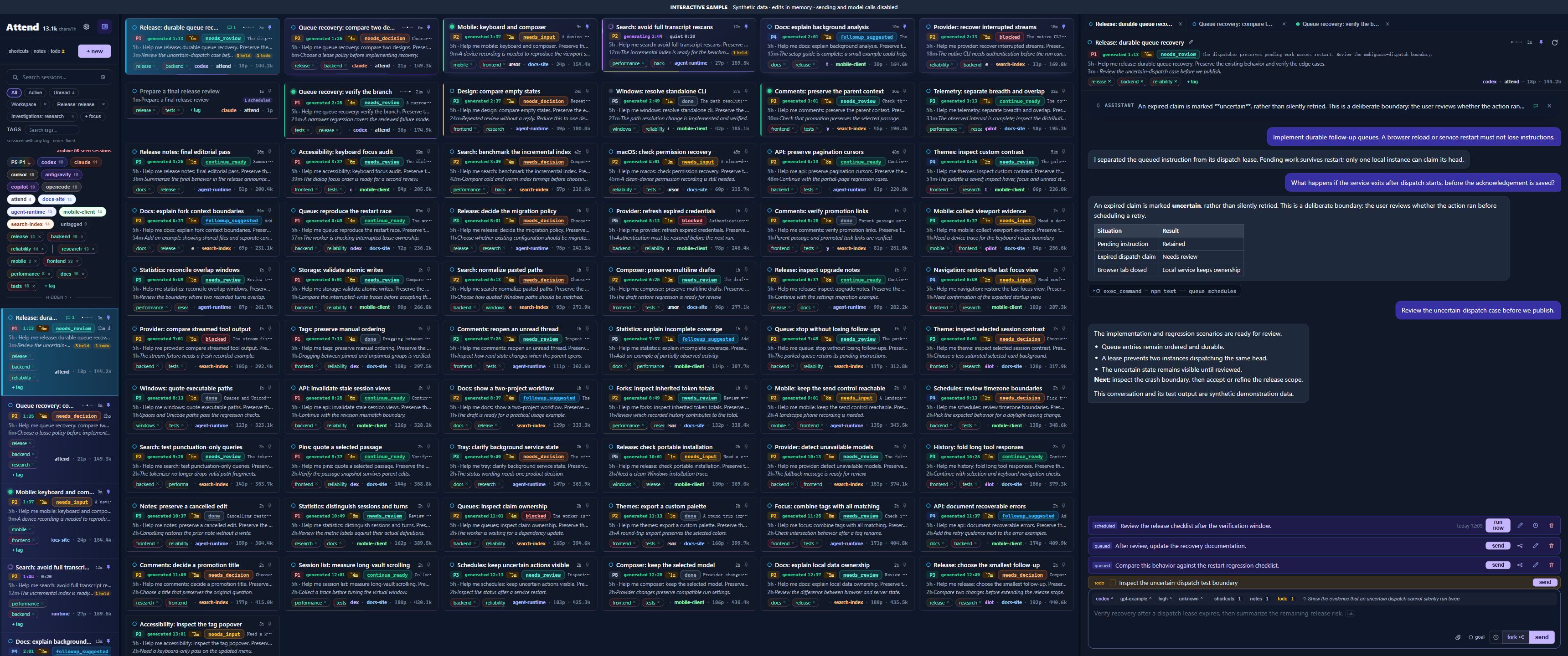 3440 × 1440 native workspace. Multiple session columns, rich analysis cards, and the conversation in view.
ONE LOCAL CONSOLE. SIX CODING CLIs.
01 / THE REAL WORKSPACE
This demo runs Attend’s own interface and styles with 60 synthetic sessions. Its middle panel uses the native multi-column grid; expand the workspace to 3440px, drag the divider, or choose a column count in Settings. Explore the session list, tags and Focus views; inspect analysis, comments, fork relationships, queues, and Work patterns. The same controls live in the local app.
Try a tag, open a task, edit its label, or choose a view above. Edits are temporary. This static workspace uses fixture metadata search; the installed app indexes real transcripts. Sending and CLI execution are disabled.
READ THE SESSION, BEFORE OPENING THE HISTORY
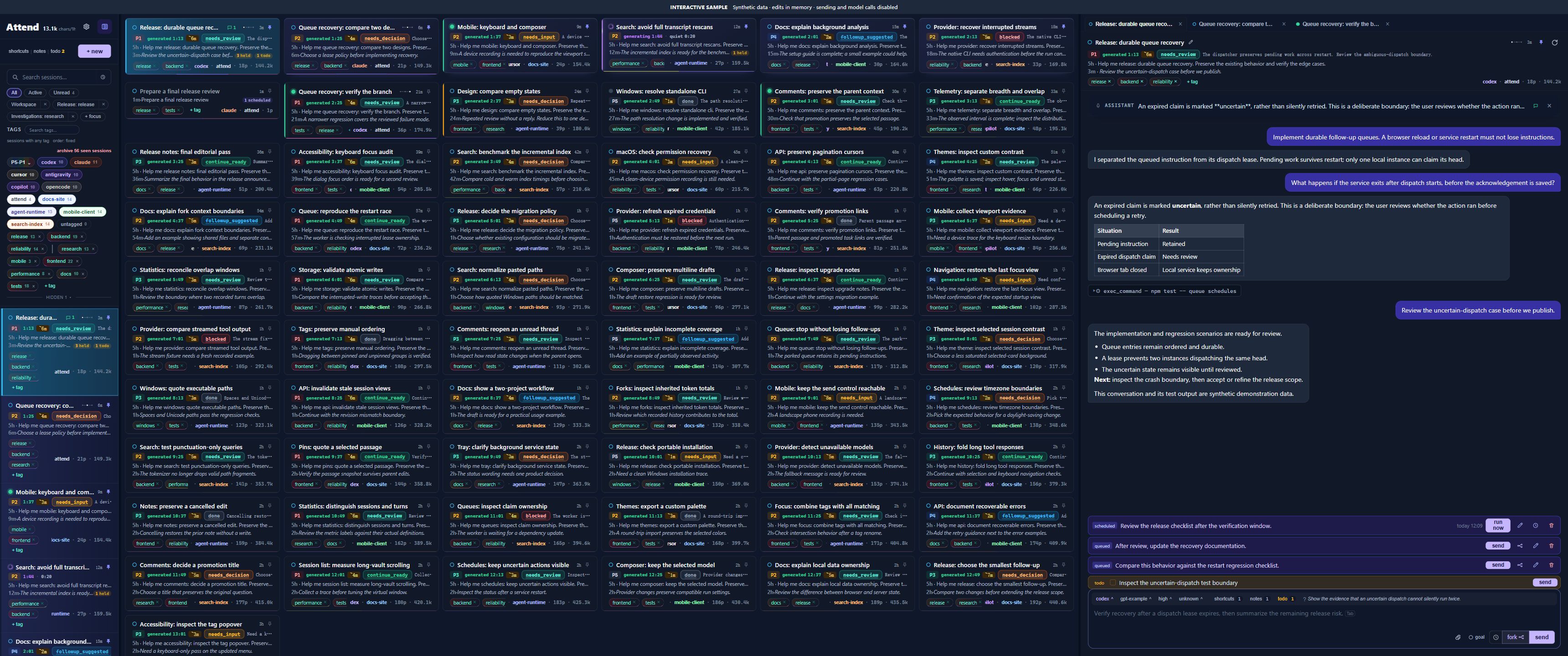
Choose what deserves attention before rereading the conversation. Human organization, live execution signals, and model-assisted handoff analysis sit together—but mean different things.
Custom title or evolving brief, project, provider, first prompt, and latest prompt. See what started the conversation and where it has moved.
Generating, a new reply, seen but still pending, or handled. Turn duration, last output and quiet time distinguish active work from a turn that needs a closer look.
A priority with its reason; a preset or custom-colored label naming what is needed now. Your manual label wins over delayed analysis for that turn.
ETA estimates how long you need to understand and respond—not how long the model will take to finish. Useful when there is only a small gap between other work.
Cumulative token usage and available input/output/cache detail, prompt count, provider, model, effort, and speed. Unknown provider data stays unknown.
Tags, notes, todos, Pins, comment threads, queued messages, schedules and fork relationships are accessible around the same session.
02 / UNDERSTAND THE HANDOFF
A finished turn might be ready to continue, waiting for a choice, missing input, blocked elsewhere, or ready for review. Attend separates that handoff state from importance, unread status, and runtime activity.
A concrete next action can proceed.
Choose a direction or tradeoff.
Provide a specific missing detail.
An external dependency must change.
Check the result against your criteria.
There is a useful optional next step.
The current task has a completed handoff.
“Waiting for device test”, “Choosing the migration path”, “Needs a second review”. Use your own text and color when the standard state is not enough. Tags keep the long-term grouping; labels describe the current handoff.
Predict the next move using the latest turn and your notes, todos, and shortcuts. Accept, edit, or ignore it.
Question a specific claim, assumption, command, or evidence gap in the latest answer. It is a separate lane, not a generic “are you sure?” prompt.
Sustained reviews or revisits without another message can surface a descriptive observation and a smaller suggested next step. Checking a generating turn is treated differently. This is not a psychological diagnosis.
Set priority, re-entry time and the current label yourself. Hand-written state takes precedence over delayed analysis for that turn; priority and turn-scoped handoff state have different lifetimes.
Suggestions fill the composer; they never send themselves. Custom labels describe the current turn and reset when the next turn begins. Historical sessions may use local heuristics instead of a paired analyzer.
03 / FOLLOW THE STRUCTURE
Sessions are not just a flat history. Keep the main line running, investigate a passage in a comment, branch to test another direction, and bring selected context back deliberately.
Chat groups keep related sessions together. Grouping does not merge their model context.
Fork from a draft, queued message, or past point in the discussion. Keep the provider or seed a new session in another. The fork tree preserves parent/child relationships.
A comment has its own conversation and attention state. It can investigate or act in the shared workspace without automatically adding its discussion to the main transcript.
Promote a finished side discussion into an ordinary session, retaining its relationship and relevant context instead of copying everything into a new blank chat.
Pin a message or passage and reference it with @. A queued message keeps a snapshot of that context; a sidebar discussion only joins the main thread when you explicitly include it.
Comments share the working directory. Separate conversation context does not imply file isolation.
04 / SEE THE WORK PATTERN
Open Work patterns from the throughput counters. Inspect session breadth, continuity, collaboration flow and resource pressure over selectable time ranges—from the last hour to 15 days.
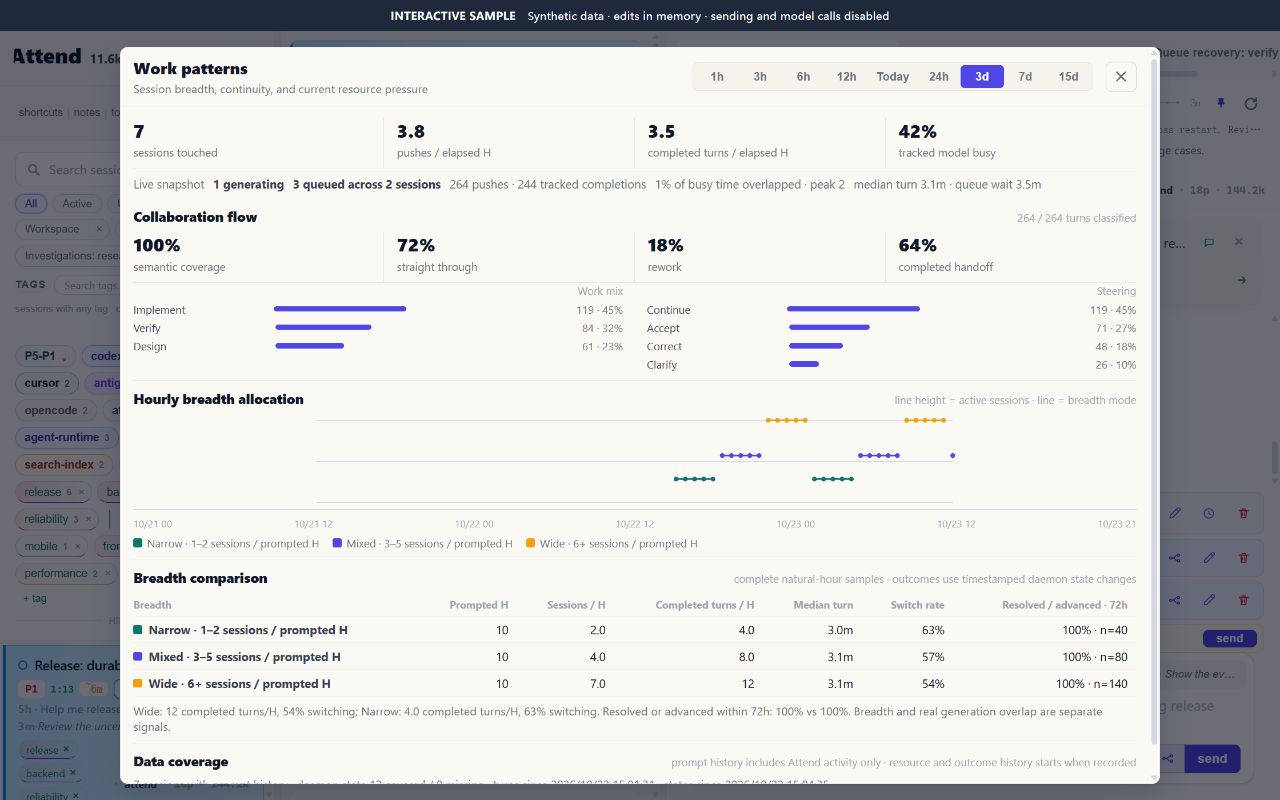
Sessions touched, pushes per elapsed hour, completed turns per elapsed hour, and tracked model busy time.
Generating sessions, queued work, overlap during busy time, peak concurrency, median turn duration and queue wait.
Semantic coverage, straight-through and rework rates, completed handoffs, plus work-intent and steering distributions.
An hourly timeline of Narrow (1–2), Mixed (3–5), and Wide (6+) sessions per prompted hour.
Prompted hours, sessions and completed turns per hour, median turn, switch rate, and resolved/advanced outcomes within 72 hours.
Recorded-history start times, sessions with and without state analysis, sample counts, and the evidence behind a comparison.
Ask · Learn · Inspect code · Research · Design · Implement · Debug · Verify · Operate · Decide
Initiate · Continue · Accept · Clarify · Challenge · Correct · Redirect · Partial / full rejection · Repeat instruction
Session breadth ≠ generation overlap. Breadth counts distinct sessions prompted in an hour. Overlap measures time when recorded turns actually run together.
Model busy ≠ CPU usage. It describes tracked turn intervals. Completed turns are recorded turn endings, not a count of successful project deliveries.
All demo figures are synthetic. Real statistics describe recorded Attend activity; coverage and minimum sample requirements are shown in the product. They are observations, not a productivity score or a claim that more parallelism is better.
05 / KEEP THE THREAD
An unopened reply and a reply you have looked at carry different attention signals. Reading a conversation does not silently mark its follow-up handled. Reply, dismiss, or flag it again when needed.
Comment on an answer or a selected passage, including during generation. Continue the discussion in its drawer, then promote it to a task. Fork with the same provider or seed a branch in another; inspect the lineage later.
Queue follow-ups while a turn runs. Edit or remove them, send a selected instruction now, or turn it into a branch. Stopping a turn holds the remaining queue. Use a one-time schedule for a message, new session, fork, or comment. The local service must be running to execute scheduled work.
Save notes and todos beside the composer. Pin a message or selected passage, reference it with @, and reuse shortcuts or model presets. Analyzer suggestions can draft a likely next message or a specific question to verify; you choose what to send.
The organizing surface is only the beginning. Open a group to see how the rest supports the same workflow.
Search session metadata and transcripts with terms, phrases, exclusions, OR, and bounded regex. Use custom tags alongside provider/project tags, tag counts, any/all matching, priority filtering, multiple Focus views, and All / Active / Unread. Pin, hide, reorder, bulk-delete tags or remove session bindings. Edit titles and jump to related tagged chats.
Start and resume supported CLIs in the browser. Stream responses, stop a turn, attach or paste files and images, and answer supported provider questions. Collapse completed turns, load older history on demand, jump to pinned passages, preview diagrams and attachments, and reveal local file paths.
See brief summaries, priority with a reason, and an estimated time to re-enter a task. Choose preset or custom colored state labels. Distinguish generation, new replies, seen follow-ups, and handled work. Background analysis offers next-message completion and a separate probe for a concrete claim or evidence gap. Suggestions remain drafts.
Durable queues preserve follow-up instructions beyond a browser reload. Edit or remove queued work, choose an instruction to send now, or fork it. Stopping a turn preserves and holds the remaining queue. One-time schedules cover messages, new sessions, forks, and comments. Scheduled session/fork cards appear in the session list; manage queued and scheduled messages in the conversation. This is not a recurring scheduler.
Comment on messages or text selections, queue comment replies, and promote a discussion into its own task. Fork from a draft or queued turn, keep or switch providers, and inspect the fork tree. Pin passages and reference them with @; queued references keep a snapshot of the selected context. Native fork support differs by CLI.
Choose system, light, dark, or custom themes. Edit theme JSON with live preview, import/export palettes, and search available colors. Customize panel layout and responsive settings. Save reusable provider/model/effort presets. Directory scopes retain their preferences across restarts and port changes. Review recent local work statistics.
06 / KEEP YOUR TOOLS
All six integrations support browsing, search, in-browser conversations, and analysis. Execution uses the installed CLI and its account. Some capabilities depend on the provider and version.
| CLI | Fork | Steer a running turn | Interactive questions | Goals |
|---|---|---|---|---|
| Claude Code | Native | Native | Native | Native |
| Codex CLI | Native | Native | Native | Native |
| Cursor CLI | Transcript-seeded | — | Reply next turn | — |
| Antigravity CLI | Transcript-seeded | — | Reply next turn | — |
| GitHub Copilot CLI | Transcript-seeded | — | Reply next turn | — |
| OpenCode | Transcript-seeded | Native | Native | — |
Transcript-seeded branches start a new session with visible parent history; they are not native provider forks. Cursor, Antigravity, Copilot, and OpenCode attachments are passed as local file paths. Attachment types vary by provider; Codex does not accept PDF attachments. “Goals” refers to Attend’s supported goal mode, not a guarantee of autonomous completion.
Attend binds to 127.0.0.1 by default. Its tags, labels, notes, queues, and preferences live in your local Attend database; original transcripts remain managed by their CLIs. Organizing your work does not require an Attend cloud account.
Running coding sessions uses the selected provider. Background analysis can also make model calls and consume your provider allowance or incur charges. Economical mode may fall back to the work-session model; choose Off in Settings to stop new background AI analysis. Local storage does not mean all inference is offline.
07 / START WHERE YOU WORK
Requires Node.js 22.13+ and a supported CLI installed and authenticated. Attend detects your available CLIs and opens the local console.
npx --package=@sinphife/attend attend "$PWD"npm install --global @sinphife/attend
attendhttp://localhost:5050
The embedded demo uses the real Attend interface with a synthetic workspace and an in-memory backend. You can explore organization, analysis, relationships and statistics. Sending prompts and starting CLI work are disabled. The full app runs locally with your installed CLIs and session history.
Historical sessions can be browsed and searched. Paired analyzer sessions are created for supported sessions started or forked in Attend; older external sessions may use local heuristics instead.
Tags are persistent organization. A custom state label describes the current handoff and overrides delayed analysis for that turn. Beginning a new conversation turn clears turn-specific state and color so they do not describe the new work incorrectly.
Attend-owned queues and scheduled jobs are durable. Closing a tab does not itself stop the local service. Scheduled work needs the service to be running; stopping Attend stops active work.
ATTEND / LOCAL-FIRST / OPEN SOURCE
Start with one tag and a label that means something to you.